
Introduction
The Amcache is a part of the Windows Application Compatibility database along with the ShimCache. The Amcache was named RecentFileCache.bcf prior to a late patch in Windows 7. The Amcache replaced RecentFileCache.bcf after the Windows 7 patch.
Forensic Value
The Amcache is a small registry hive that contains data about applications that have been run on a Windows system. An application that is listed in the Amcache suggests that it was run on the given system.
The Amcache can not be pulled from a live machine. The Windows operating system has it locked down to prevent editing or reading of the hive.
The SHA1 hash value of an executable can be found in the Amcache. This hash value can help track malware by analyzing the hash through various websites such as VirusTotal.
Data
The Amcache provides valuable information including:
- Application execution path
- File created and last modified times
- Last Modified time shows the first time the executable was run?
- Subsequent runs aren’t recorded in the hive?
- SHA1 Hash value of the executable
- PE Header hash
- Version information
- Creator of the executable
- Volume GUID’s
There are 4 keys under the root key shown below.
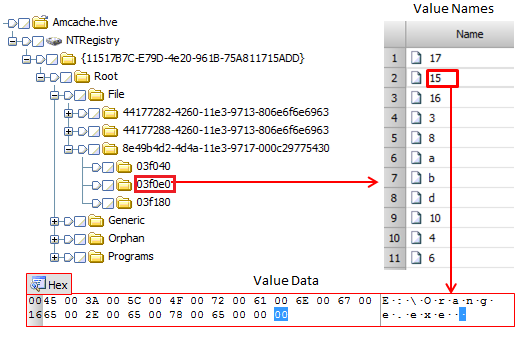
The ‘File’ key has information relevant to forensic examiners. The keys under ‘File’ are grouped by Volume GUID’s. These Volume GUID’s can be matched with the GUID’s at HKLM\SYSTEM\MountedDevices. The keys under the Volume GUID’s represent unique files (03f040 and 03f0e0 in the above image). The ‘Value Names’ under each unique file key contains information about the file. Refer to Amcache.hve in Windows 8 (Part 1) – Yogesh Khatri for more information about the ‘Value Names’
Location
The Amcache is located at <DRIVE>\Windows\AppCompat\Programs\Amcache.hve
Demo
In-progress
 Ben Kixmiller's DFIR Website
Leave a comment